In short — On a fully automatic packaging line, the industrial display is far more than a panel that shows numbers. It is the operator's window into the machine, the parameter-entry terminal that feeds the PLC, and frequently the local station for video and process monitoring.
Choosing the right one — in the right size, with the right ingress protection, interfaces and industrial-grade reliability — directly affects uptime, packaging consistency and how fast an operator can recover from a product changeover or a fault. This article walks through the packaging workflow, the control-cabinet architecture and the nine selection criteria that actually matter on the factory floor.
The Fourth Industrial Revolution has pushed automation, digitalisation and intelligence to the top of every manufacturer's roadmap. Across the production chain — from raw-material handling and distribution, to shop-floor manufacturing, visualisation, monitoring, inspection, quality control, packaging and outbound logistics — automated equipment has become the norm rather than the exception.
Packaging is a mandatory final step in food, chemical, pharmaceutical and light-industry production. Manual packaging, still common in smaller plants, carries three persistent problems: unstable efficiency, inconsistent pack quality and rising labour cost. Fully automatic packaging machines invert that equation. They are convenient to operate, fast, clean and hygienic, energy-efficient, and — most importantly for today's cost structure — they reduce dependence on manual labour.
Here is the subtle point that is often missed in equipment selection discussions: as the line becomes more automatic, the human interface becomes more critical, not less. Operators no longer turn a dial or press a mechanical counter; they interact with a screen. Every recipe, every correction factor and every fault message passes through that display. If the screen is slow, hard to read, intolerant of dust, or poorly matched to the PLC, the result is clear.
The entire line's effectiveness is capped by that one component.
In the domestic market, fully automatic packaging machines fall broadly into three categories. Understanding which family a line belongs to helps define the display's role and the parameters an operator will key in.
Table 1. Packaging machine families and their display interaction focus
|
Machine family |
How it works |
Typical products |
Display interaction focus |
|
Form-fill-seal (bag-making) |
Forms a bag from roll stock, fills and seals in one continuous cycle |
Snacks, powders, granules |
Film length, bag length, sealing temperature, count |
|
Pre-made pouch feed (bag-giving) |
Picks, opens, fills and seals pre-formed pouches |
Food, daily chemicals, pharma |
Pouch size, fill weight, opening and sealing parameters |
|
Can / container feeding (can-giving) |
Feeds, fills and closes rigid cans or containers |
Beverages, chemicals, canned goods |
Container diameter, fill level, capping torque |
A complete automatic packaging sequence is a chain of interlocked stations. Each station reports status to, and receives commands from, the control system. A common sequence runs as follows.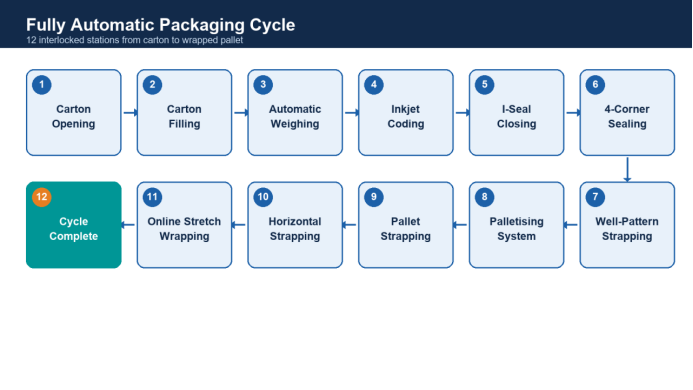
Figure 1. Twelve interlocked stations in a typical fully automatic packaging cycle.
The display does not merely observe this chain. It is where recipes are selected, where station status is visualised, and where an operator intervenes when a station reports a fault.
The independent control cabinet is the operational centre of the whole packaging system. It typically contains four elements: the touch display device (the human-machine interface, or HMI), the PLC programming system (the logic controller), the control software (the application running the process) and an external operator console for physical, local control.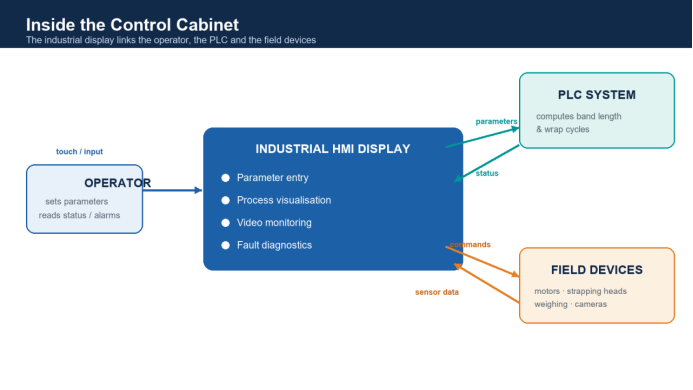
Figure 2. The industrial display links the operator, the PLC and the field devices.
Within this architecture, the industrial display serves as the cabinet's main control device. It is the primary equipment for packaging inspection, system operation monitoring, programming and software execution. In practical terms, it is the single point where four jobs converge:
This is why a packaging-line display is specified very differently from an office monitor or a consumer touchscreen. The environment is dusty, the duty cycle is continuous, and the consequences of a display failure are measured in stalled pallets and missed shipments.
One of the clearest examples of the display's real role is the strapping and wrapping calculation. In a typical configuration, the cabinet must connect to the PLC so that the operator can enter the product's inner diameter, outer diameter, width and correction parameters directly on the display. The PLC then automatically calculates the required strapping-band length and the number of wrap cycles.
That closed loop — operator enters geometry on screen, PLC computes the motion profile, the machine executes — is the essence of modern packaging control. It also sets three non-negotiable requirements for the display: it must accept and validate numeric input reliably, it must exchange data with the PLC over a stable interface, and it must remain readable and responsive throughout a long, vibration-heavy shift.
A widely used reference configuration is a second-generation industrial display with a 19-inch screen — a flat, panel-mount unit designed for a control cabinet. But the exact model matters less than the underlying criteria. The following nine points form a practical selection framework that can be applied to almost any automatic packaging project.
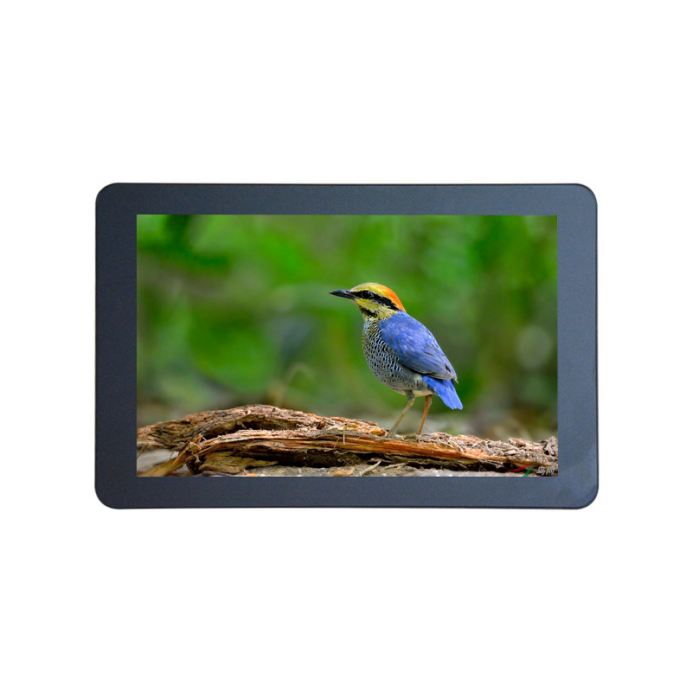
Figure 3. A typical industrial display for a packaging control cabinet — flat front panel for flush mounting.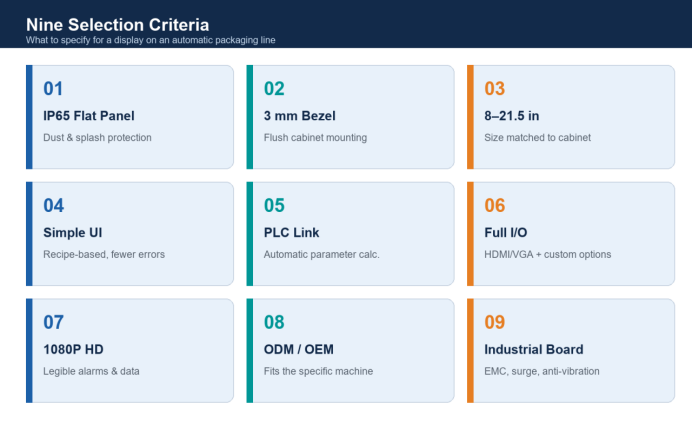
Packaging generates dust — from powders, carton board and film trim. A streamlined design with a pure flat front panel rated IP65 keeps dust and splashes out of the machine interior, protecting both the display and the cabinet electronics. A raised bezel or a fan-cooled consumer panel will collect product dust and fail early in this environment.
A front panel thickness of only 3 mm allows the display to be embedded into the control cabinet with a near-seamless fit. Beyond appearance, a flush mount is easier to clean — an important detail in food and pharmaceutical lines where washdown and hygiene matter.
The 19-inch size in the reference case was chosen to suit the customer's specific control cabinet. In practice, industrial displays for this role span roughly 8 to 21.5 inches. Select by cabinet cut-out, viewing distance and the amount of data the operator must read at once — not by "bigger is better".
The interface should be deliberately simple: operators set product-related parameters, and the system automatically adjusts the corresponding packaging parameters. A well-designed HMI reduces training time and, more importantly, reduces the chance of an operator entering a wrong value during a fast changeover.
The display must connect to the programmable logic controller so that inputs such as inner/outer diameter, width and correction values can be passed through, and the PLC can compute band length and wrap count. Confirm the supported PLC protocols and driver support before specifying the panel.
Beyond standard HDMI and VGA inputs, packaging projects often need custom interface configurations to connect an industrial PC or legacy machine controller. Ask the supplier which interfaces are standard and which can be specified as options — retrofitting an interface later is expensive.
With HDMI and VGA support up to 1080P, the display renders packaging video monitoring and process data clearly. Sharp text matters for alarm messages and parameter tables; a low-resolution panel turns a small font into an operator error waiting to happen.
Different packaging lines present different mechanical and electrical constraints. ODM/OEM customisation — of bezel, mounting, interfaces, firmware or branding — lets the display be adapted to the specific application instead of forcing the machine design around a standard panel.
The display should use a self-developed industrial-grade drive board meeting GB/T 2423 vibration requirements and EMC/EMI immunity standards, with flame-retardant, explosion-resistant and surge-protected design. This is what keeps long-duration video monitoring and control-software execution stable when the line runs for hours beside motors, contactors and high-speed strapping heads.
Table 2. Summary — what to specify up front
|
Criterion |
What to ask for |
Why it matters |
|
Front panel |
Flat, IP65 |
Dust and splash ingress protection |
|
Bezel |
Approx. 3 mm, flush mount |
Cleanability and cabinet fit |
|
Size |
8–21.5 in; match cabinet |
Readability and cut-out compatibility |
|
UI |
Simplified, recipe-based |
Fewer operator errors |
|
PLC link |
Confirmed protocol support |
Enables automatic parameter calculation |
|
Interfaces |
HDMI/VGA + custom options |
Connects IPC and legacy controllers |
|
Resolution |
Up to 1080P |
Legible alarms and data |
|
Customisation |
ODM/OEM available |
Fits the specific machine |
|
Reliability |
Industrial board, EMC, surge, flame-retardant |
Continuous, vibration-heavy duty |
The industrial display in a packaging line is a control asset, not a peripheral. It sits at the intersection of the operator, the PLC and the process, and its quality determines how smoothly recipes are entered, how clearly faults are diagnosed and how reliably the line runs shift after shift. Specify it with the same rigour you would apply to the PLC itself — and the packaging line will reward you with higher uptime and more consistent output.