On a packaging machine, the LCD is far more than a screen that shows numbers. It is the operator's window into speed, throughput, alarms and parameters, and the front end of a complete human–machine interaction system built around the PLC, sensors, drives and actuators.
Choosing the right size, resolution, touch technology and industrial specifications directly affects uptime, changeover speed and how quickly an operator can recover from a fault. This guide explains what an industrial LCD actually does, how it fits into the control architecture, and the selection criteria that matter on the factory floor.
Packaging lines run fast. A single machine may fill, seal, label, check and eject hundreds of units per minute, coordinating dozens of motors, sensors and actuators in a tight sequence. In that environment, an operator who has to read a mechanical counter, interpret a stack of indicator lights and guess why the line stopped is an operator losing production.
A well-chosen screen turns scattered data into one clear interface — so the person on the floor can see, decide and act in seconds.
On packaging equipment, an industrial LCD typically carries four jobs. Understanding them first makes every later specification decision easier.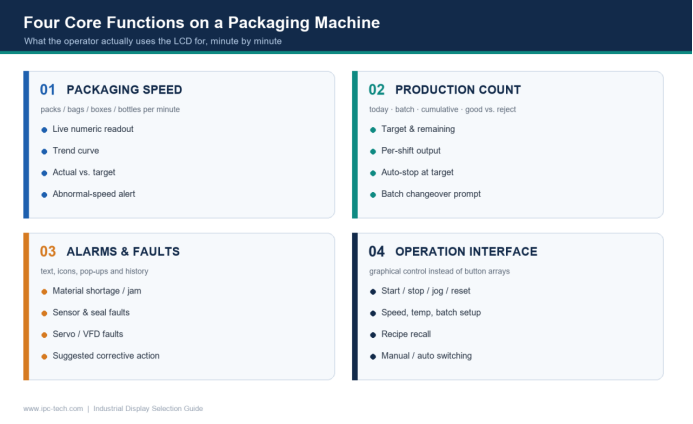
Speed is the most watched parameter on any packaging machine — usually expressed in packs, bags, boxes or bottles per minute. A useful HMI does not just show a live number. It can show a trend curve, compare actual speed against target, flag an abnormal drop, and expose the acceleration and deceleration settings behind it.
Consider a cartoner: the operator sees the current rate in boxes per minute and whether it is tracking the target. If speed suddenly falls, the screen should also reveal why — missing material, a jammed carton, a sensor out of position. The point is not a prettier display; it is a faster diagnosis of whether the line is slowing normally or developing a fault.
Counting is the most frequently used function. A practical display can show today's output, the current batch quantity, cumulative totals, good versus rejected units, the target, the remaining quantity and per-shift production.
In batch production, an operator sets a target — say 5,000 boxes — and the screen updates completed and remaining counts in real time, automatically stopping or prompting a changeover when the target is reached. This matters across food, pharmaceutical, personal care, electronics and hardware packaging alike.
Unplanned stops with an unknown cause are the most expensive kind. An alarm interface that states the fault directly — not just a red light — removes guesswork. Typical alarms include material shortage, blockage, bag or carton jams, photoelectric sensor faults, sealing-temperature deviation, servo and drive faults, safety door open, emergency stop, low air pressure, film exhausted and registration mark tracking errors.
Without a display, operators rely on indicator lights and an audible buzzer, and diagnosis is slow. With text, icons, pop-ups and a history list, the screen can even suggest a corrective action. Tea-bag packaging equipment, for example, commonly monitors and alarms on missing material, empty bags and label thread or paper — and stops automatically for safety. That logic is exactly what an industrial HMI screen delivers.
Packaging HMIs consolidate start, stop, jog, reset, zero, speed setting, temperature setting, count and batch setup, recipe recall, manual/auto switching, alarm history and parameter saving into a graphical interface. Instead of facing a wall of buttons, the operator works through a structured screen. The effect is lower training cost for new operators and fewer mis-operations during changeovers.
An industrial LCD almost never works alone. A typical packaging display-and-control system has four cooperating layers.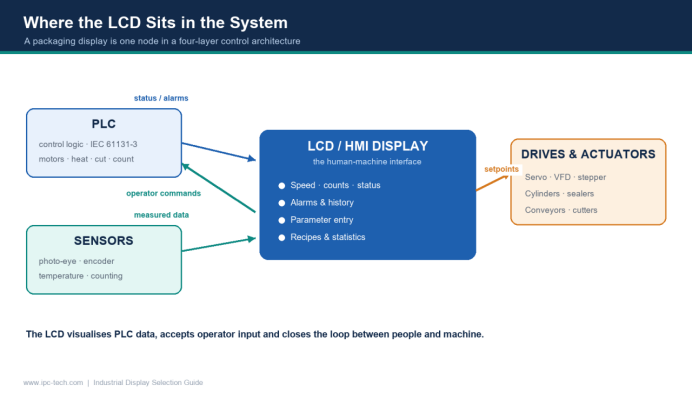
The LCD's role is therefore to connect people and machine: let operators understand the equipment, control it confidently and trace faults. It is a node in the control loop, not a standalone monitor — which is why interface compatibility and electrical integration deserve as much attention as the panel itself.
Packaging HMIs span roughly 4.3 to 15.6 inches. Each size has a natural fit.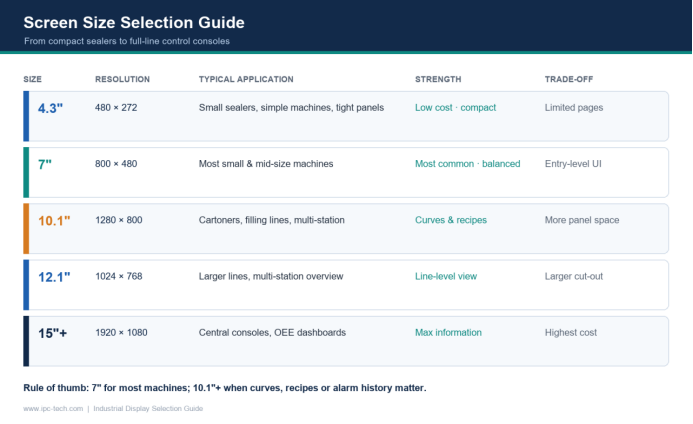
Figure 3. Screen size, resolution and typical application at a glance.
Table 1. Screen size, typical resolution and best-fit application
|
Size |
Typical resolution |
Best fit |
Trade-off |
|
4.3" |
480 × 272 |
Small sealers, simple wrappers, tight panels |
Low cost; limited pages |
|
7" |
800 × 480 |
Most small and mid-size packaging machines |
Most common economic choice |
|
10.1" |
1024 × 600 / 1280 × 800 |
Cartoners, filling lines, shrink wrappers, multi-station |
Room for curves and recipes |
|
12.1" |
800 × 600 / 1024 × 768 |
Larger lines, multi-station status, line overview |
Larger panel cut-out |
|
15" / 15.6" |
1024 × 768 / 1920 × 1080 |
Central consoles, full-line control, OEE dashboards |
Highest cost and integration effort |
7 inch is the workhorse. It is the most frequently specified size because it balances cost, viewing area and touch ergonomics for the majority of machines. If the interface needs speed curves, recipe management or detailed alarm history, move up to 10.1 inch or larger — the extra room pays for itself in operator speed.
For a full line rather than a single machine — where the panel must show multiple stations, line speed, machine interlocks, alarm distribution, OEE and batch data — a 12.1 or 15 inch display is the better fit.
Packaging interfaces do not need extreme resolution. They need to be clear, stable and legible at a glance. The pairings above are proven in the field: 800 × 480 is sufficient for speed, counts, alarms and basic parameters; 1024 × 600 or 1280 × 800 suits trend curves and graphical flow diagrams; 1920 × 1080 is reserved for large, high-information displays.
A practical warning: do not chase resolution blindly. Higher resolution raises the demand on the host controller, the interface development effort and the driver board. On a packaging machine, a bright, high-contrast 800 × 480 screen that an operator can read through dust and gloves is more valuable than a sharp 1080p panel that washes out under cabinet lighting.
Two touch technologies dominate packaging machinery, and neither is universally better.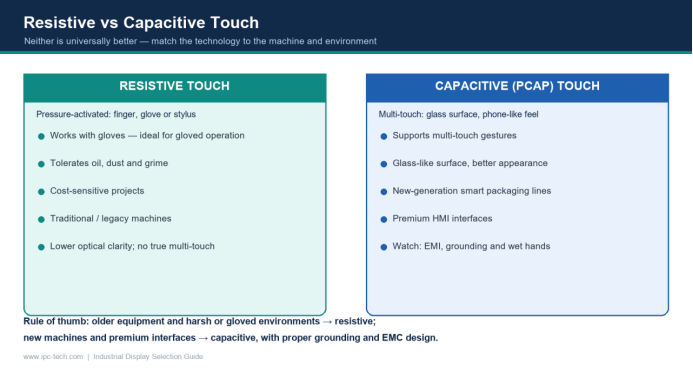
Figure 4. Match the touch technology to the machine and environment.
Resistive touch responds to pressure, so it works with a finger, a glove or a stylus. It suits traditional machines, operations where gloves are mandatory, and environments with oil, dust or grime — and it is cost-sensitive. Its limitations are lower optical clarity and no true multi-touch.
Projected capacitive (PCAP) touch supports multi-touch, offers a glass-like surface and feels closer to a phone or tablet. It fits new-generation machines, premium HMIs and smart lines where appearance and interaction quality matter.
The caution with capacitive touch is interference. Packaging machines are full of motors, VFDs and servos; with poor grounding, a capacitive panel can register spurious touches or "ghost" inputs. Water, oil and wet hands create similar problems. If you choose PCAP, treat grounding, shielding and controller tuning as part of the specification — not an afterthought.
Rule of thumb: older equipment and harsh, oily or gloved environments → resistive. New machines and premium interfaces → capacitive, with proper EMC and grounding design. Industrial environments should follow the immunity requirements of IEC 61000-6-2, and drive-induced noise should be checked during commissioning.
Once size and touch are settled, six parameters decide whether a display survives in a packaging environment.
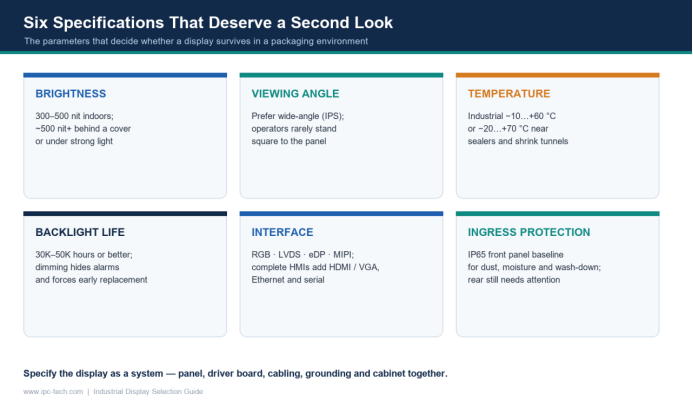
Figure 5. The six parameters that determine field reliability.
Table 2. Specification checklist and recommended values
|
Parameter |
Recommendation |
Why it matters |
|
Brightness |
300–500 nit indoors; ~500 nit+ under a cover or strong light |
Alarms and numbers must stay readable |
|
Viewing angle |
Prefer wide-angle (IPS-type) LCD |
Operators rarely stand square to the panel |
|
Operating temperature |
−10…+60 °C or −20…+70 °C |
Heat from sealers, ovens and shrink tunnels |
|
Backlight life |
30,000–50,000 hours or better |
Dimming hides alarms and forces early replacement |
|
Interface |
RGB · LVDS · eDP · MIPI; HDMI/VGA for complete monitors |
Must match the host board or external ports |
|
Ingress protection |
IP65 front panel baseline |
Dust, moisture, oil and wash-down cleaning |
Note that "IP65 front panel" protects the face only — the rear and cabinet integration still need attention. Specify the display as a system: panel, driver board, cabling, grounding and cabinet together.
A mature packaging HMI is organised into a handful of purpose-built pages. Each has one job and should be reachable in a tap or two.
Even a good panel can misbehave if the integration is weak. The table below maps the symptoms most often seen on packaging lines to their likely causes.
Table 3. Field symptoms, likely causes and first checks
|
Symptom |
Likely root cause |
First checks |
|
Screen noise / "flower screen" |
Loose cable, LVDS/RGB interference, unstable power, mismatched driver board |
Reseat connectors, shorten and shield cable, verify supply ripple |
|
Black screen |
Backlight failure, no board output, power fault, panel damage |
Measure backlight voltage, check board LED, swap panel to isolate |
|
Inaccurate touch |
Wrong calibration, controller fault, poor grounding, EMI, ageing layer |
Recalibrate, check earth bond, reroute away from drives |
|
Spurious touches (PCAP) |
Moisture, oil, weak grounding, VFD interference, poor tuning |
Dry and clean surface, improve shielding, retune sensitivity |
|
Backlight dimming |
Backlight ageing, high ambient temperature, long full-brightness runs |
Check runtime hours, reduce duty cycle, verify thermal design |
Most of these are integration problems, not panel defects — which is why the driver board, cable harness, grounding and cabinet layout deserve as much specification effort as the LCD itself.
Different machines justify different levels of specification. Three practical starting points:
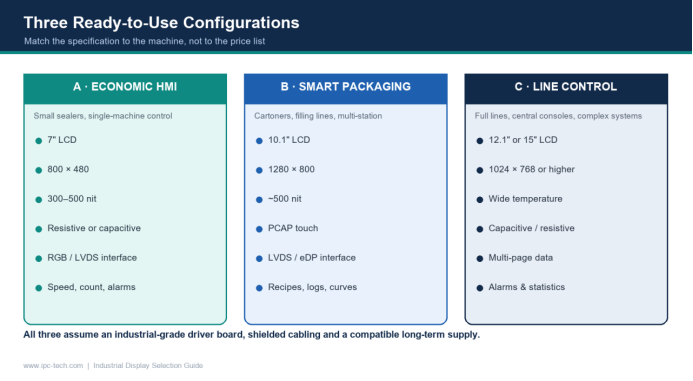
Figure 6. Match the configuration to the machine, not to the price list.
Configuration A — 7" economic HMI (small sealers, single-machine control): 7" LCD, 800 × 480, 300–500 nit, resistive or capacitive touch, RGB/LVDS interface, speed/count/alarm display. A cost-effective baseline for standalone machines.
Configuration B — 10.1" smart packaging HMI (cartoners, filling lines, shrink wrappers, multi-station): 10.1" LCD, 1280 × 800, ~500 nit, PCAP touch, LVDS/eDP interface, recipes, alarm log, production statistics and speed curves.
Configuration C — 12.1"/15" line-control display (full lines, central consoles, complex systems): 12.1" or 15" industrial LCD, 1024 × 768 or higher, wide temperature range, capacitive or resistive touch, multi-page data, alarm records and production statistics.
Q: What does an LCD display on packaging equipment mainly show?
A: Packaging speed, current and cumulative counts, alarms, running status, parameter settings and operation menus. Packaging HMIs are also used to monitor production counts, performance data and alarm logs.
Q: What screen size is typical for packaging machines?
A: Small machines commonly use 4.3" or 7"; mainstream automatic packaging machines use 7" or 10.1"; large lines and central consoles use 12.1", 15" or larger.
Q: Resistive or capacitive touch?
A: Resistive for legacy machines, gloved operation and oily or dusty environments; capacitive for new smart machines and premium interfaces — provided grounding and interference are properly managed.
Q: What is most often overlooked when specifying a display?
A: Interface compatibility and the real site environment. Signal and touch interfaces, PLC/HMI communication, shop-floor dust and oil, electromagnetic interference and long running hours must be considered together — not just size and price.